Saturday, June 3, 2023

Safeguarding Your Business: Enhancing Data Loss Disaster Preparedness

Data loss disasters can arise from many sources, including natural disasters, hardware and software malfunctions, unforeseen circumstances, human errors, and cyberthreats. By examining each type, businesses can better plan and prepare for these scenarios.


The COVID-19 pandemic has reminded us of our vulnerability as a species and the potential damage that disasters, both natural and human-made, can cause. It is crucial for businesses, regardless of size, to prioritize business continuity and resilience in the face of potential data loss incidents. This article will explore various forms of data loss disasters, offer strategies for preparation, and highlight the importance of backup and disaster recovery (BCDR) in maintaining regulatory compliance obligations.


Section 1: Understanding the Spectrum of Data Loss Disasters


Data loss disasters can arise from many sources, including natural disasters, hardware and software malfunctions, unforeseen circumstances, human errors, and cyberthreats. By examining each type, businesses can better plan and prepare for these scenarios.

- Natural Disasters - Natural disasters such as storms, hurricanes, floods, fires, tsunamis, and volcano eruptions can lead to infrastructure damage, power failures, and mechanical breakdowns, resulting in data loss. Implementing BCDR measures is essential in mitigating such risks.


- Hardware and Software Malfunctioning - Data loss can occur due to software and hardware failures, which may stem from bugs, glitches, configuration errors, component failures, or outdated systems. By proactively implementing BCDR measures, businesses can safeguard against potential losses.


- Unforeseen Circumstances - Random and unexpected scenarios can also cause data loss incidents. For instance, theft of portable hard disks, water leaks in server rooms, or pest infestations in data centers. Anticipating and addressing such possibilities through comprehensive disaster recovery planning is vital.


- Human Factor - Research indicates that approximately 64% of data loss incidents are caused by human errors. These errors encompass accidental file deletions, overwriting existing files, naming convention mistakes, failure to save or back up data, or even physical damage to storage devices. Educating employees about data management and establishing protocols can significantly reduce the occurrence of such errors.


- Cyberthreats - Businesses are at risk of malware, ransomware, virus attacks, and malicious insiders with unauthorized access, all of which can result in data loss. Combining robust cybersecurity measures with BCDR solutions can help mitigate these risks and ensure data integrity.

Section 2: Effective Strategies for Data Loss Disaster Preparedness


To minimize the impact of data loss disasters, businesses must proactively plan and prepare. Implementing the following strategies will help organizations enhance their disaster preparedness:

- Perform a Business Impact Analysis and Recovery Plan - Conduct a comprehensive analysis of key functions and develop a recovery plan to outline the necessary steps to restore operations after a disaster strikes.


- Define Recovery Point Objective (RPO) and Recovery Time Objective (RTO) - Determine the acceptable levels of data loss and downtime during recovery, respectively, to ensure an optimal balance between data protection and operational continuity.


- Establish a Business Continuity Team - Create a dedicated team responsible for coordinating disaster response efforts and ensuring effective communication throughout the recovery process.


- Train Staff in Backup Management and Data Recovery - Educate employees on best practices for data backup, storage, and recovery. Regular training sessions can empower staff members to actively contribute to data loss prevention and recovery efforts.


- Implement Off-Site and Cloud Backup Solutions - Store critical business data off-site and leverage cloud-based backup services to protect against physical and local infrastructure failures.


- Conduct Threat Analysis and Define Recovery Steps - Identify potential threats to data security and formulate detailed recovery steps for each scenario to ensure a swift and effective response.


- Perform Regular Security Audits and Drills - Conduct routine security audits to assess the efficiency of disaster response plans. Additionally, simulate mock drills to test the preparedness of staff and identify areas for improvement.


- Keep the Plan Updated and Communicate Responsibilities - Regularly review and update the disaster recovery plan to account for changes in technology, personnel, and business operations. Ensure that all team members are aware of their roles and responsibilities during a data loss incident.


- Utilize Remote Monitoring Tools - Implement remote monitoring tools to continuously track and assess data backup activities, enabling swift action in case of anomalies or failures.


- Invest in Reliable Backup and Disaster Management Solutions - Seek robust BCDR solutions that offer seamless integration, secure data backup, SaaS-based options, and minimal hardware or network bandwidth requirements.


- Enhance Physical Protection Measures Consider employing waterless fire protection systems, moisture sensors, surge protectors, and backup battery systems to safeguard critical infrastructure from physical damage.

Section 3: Leveraging BCDR for Regulatory Compliance


Adopting a robust BCDR solution not only safeguards against data loss but also helps businesses meet regulatory compliance obligations. Features such as constant backup monitoring, advanced threat detection, immutable audit logs, access control requirements, data retention rules, and infrastructure or storage controls simplify compliance processes.

Conclusion:

Data loss disasters are inevitable, but businesses can significantly minimize their impact by prioritizing BCDR as a critical component of their continuity and resilience plans. By taking proactive measures and investing in reliable backup and disaster management solutions, organizations can protect their data, maintain regulatory compliance, and ensure swift recovery in the face of any unforeseen event. For personalized guidance on building a reliable disaster recovery plan, reach out to our experts today.

 
https://avantinetworks.com/safeguarding-your-business-enhancing-data-loss-disaster-preparedness/

Tuesday, May 23, 2023

What happens when you do not keep up with updates on your technology.

What happens when you do not keep up with updates on your technology.
It is obvious updating your computer and technology is important and should be done. Our experience that non-managed customers have a 20% failure rate of their technology being updated from computers, switches, printers to firewalls fail to update or has been forgotten to be updated.

Things to consider:
• Security vulnerabilities
• Performance issues
• Compatibility problems
• Missing out on new features.
• Hardware compatibility

(If you want to skip directly to a comprehensive document and solutions, go to https://avantinetworks.com/white-paper-form-3/ )
Here are some real-life scenarios:

EXAMPLE 1:
Recently, we had a customer complaint that he found one of their employees struggling with Outlook. The end users said to my customers “I have been working on fixing it for hours, I then gave up and started using webmail”. The customer was upset that the employee had said nothing to him and there was a loss of productivity in other words TIME and MONEY.
The customer ended up calling us to help them out. So, one of my Technology Specialist logged on remotely to the PC and simply did an OFFICE software update, 10 minutes later it was fixed. While we were on that PC, we also updated windows and seemed to run faster after the updates.

EXAMPLE 2:
One of my customers had called us, to say that a MAC computer could not log into the VPN. This MAC was to IOS version old, and the end user was afraid to update it. VPN software sometimes REQUIRES your computer to be fully up to date before the installation can proceed.

If you enjoyed this post, please click share it or like button it will be greatly appreciated. Do not forget to follow our page!

What happens when you do not keep up with updates on your technology.

What happens when you do not keep up with updates on your technology.
It is obvious updating your computer and technology is important and should be done. Our experience that non-managed customers have a 20% failure rate of their technology being updated from computers, switches, printers to firewalls fail to update or has been forgotten to be updated.

Things to consider:
• Security vulnerabilities
• Performance issues
• Compatibility problems
• Missing out on new features.
• Hardware compatibility

(If you want to skip directly to a comprehensive document and solutions, go to https://avantinetworks.com/white-paper-form-3/ )
Here are some real-life scenarios:

EXAMPLE 1:
Recently, we had a customer complaint that he found one of their employees struggling with Outlook. The end users said to my customers “I have been working on fixing it for hours, I then gave up and started using webmail”. The customer was upset that the employee had said nothing to him and there was a loss of productivity in other words TIME and MONEY.
The customer ended up calling us to help them out. So, one of my Technology Specialist logged on remotely to the PC and simply did an OFFICE software update, 10 minutes later it was fixed. While we were on that PC, we also updated windows and seemed to run faster after the updates.

EXAMPLE 2:
One of my customers had called us, to say that a MAC computer could not log into the VPN. This MAC was to IOS version old, and the end user was afraid to update it. VPN software sometimes REQUIRES your computer to be fully up to date before the installation can proceed.

If you enjoyed this post, please click share it or like button it will be greatly appreciated. Do not forget to follow our page!

Thursday, May 18, 2023

6 Things To Know When You Disregard HIPPA

HIPPA SECURITY RULES

Avanti Networks Inc. can assist you in getting your technology up to the appropriate standard, but If you do not follow HIPAA (Health Insurance Portability and Accountability Act) rules, which are designed to protect the privacy and security of individuals' health information, several consequences can occur for your business. Here are some potential outcomes:

Legal Penalties: Non-compliance with HIPAA regulations can result in significant legal penalties. The Department of Health and Human Services' Office for Civil Rights (OCR) enforces HIPAA and has the authority to impose fines and sanctions for violations. The penalties can range from civil monetary fines to criminal charges, depending on the severity and intent of the violation.

Monetary Fines: The OCR can impose monetary penalties for HIPAA violations. The amount of the fine depends on various factors, such as the nature and extent of the violation, the organization's level of negligence, and the harm caused to individuals. The fines can be substantial and may range from thousands to millions of dollars.

Legal Liability: Non-compliance with HIPAA can expose your business to potential lawsuits from affected individuals or other parties. If a breach of protected health information (PHI) occurs due to your failure to follow HIPAA rules, individuals whose information was compromised may seek legal action against your organization, seeking damages for any harm or losses suffered.

Reputational Damage: HIPAA violations can lead to significant damage to your business's reputation and trustworthiness. News of a privacy breach or failure to protect patient information can quickly spread through media and social channels, negatively impacting your brand image. Rebuilding trust with customers, clients, and partners may prove challenging and have long-lasting consequences.

Loss of Business Opportunities: Being non-compliant with HIPAA regulations can result in the loss of business opportunities. Healthcare providers, insurers, and other organizations handling sensitive health information often require stringent privacy and security measures to ensure compliance with HIPAA. If your business fails to meet these requirements, potential partners or clients may choose to work with other compliant entities instead.

Increased Oversight and Audits: A history of non-compliance can attract additional scrutiny from regulatory bodies, leading to increased oversight and audits. The OCR may conduct investigations into your business practices to ensure compliance, which can be time-consuming and resource-intensive.

It is crucial to prioritize HIPAA compliance to protect the privacy and security of individuals' health information and avoid the severe consequences that can result from non-compliance. If you have concerns or uncertainties about HIPAA rules, consulting with legal professionals experienced in healthcare regulations can provide valuable guidance for your specific situation.


https://avantinetworks.com/hippa-security-rules/

Wednesday, May 17, 2023

10 Things To Understand To Increase Your Cybersecurity

Password Strength

In cybersecurity, it is essential to trust reliable sources and adopt best practices to ensure your online safety. Here are some key aspects to consider:

- Trusted Security Solutions: Rely on reputable and well-established cybersecurity solutions from trusted vendors. Use antivirus software, firewalls, and anti-malware programs to protect your devices and networks.


- Regular Updates: Keep your operating system, applications, and security software up to date. Regularly installing updates and patches ensures that known vulnerabilities are patched, enhancing your protection against potential threats.


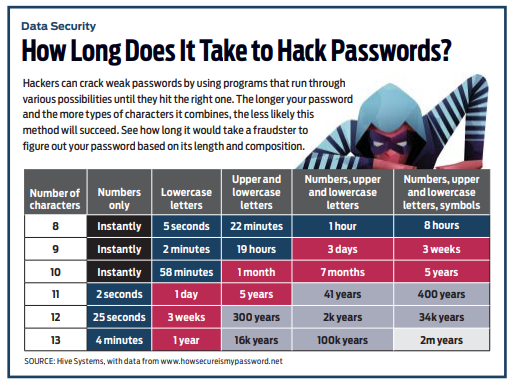
- Strong Passwords: Use strong, unique passwords for all your online accounts. Include a combination of upper and lowercase letters, numbers, and special characters. Avoid using easily guessable information like birthdays or names.


- Multi-Factor Authentication (MFA): Enable MFA whenever possible. This adds an extra layer of security by requiring a second form of authentication, such as a code sent to your mobile device or biometric verification, in addition to your password.


- Secure Network Connections: Be cautious when connecting to public Wi-Fi networks, as they may be insecure and expose your data. Whenever possible, use a virtual private network (VPN) to encrypt your internet traffic and ensure a secure connection.


- Safe Browsing Habits: Exercise caution while clicking on links or downloading files from unfamiliar websites, emails, or social media messages. Be wary of phishing attempts, which often aim to trick users into revealing sensitive information.


- Regular Backups: Regularly back up your important data to an external device or secure cloud storage. In the event of a cyber incident, having backups ensures that you can restore your data without paying a ransom or losing critical information.


- Education and Awareness: Stay informed about the latest cybersecurity threats and best practices. Educate yourself and your team members about common attack vectors, such as phishing and social engineering, to avoid falling victim to them.


- Privacy Settings: Review and adjust the privacy settings on your devices, applications, and social media platforms. Limit the amount of personal information you share online and only allow necessary access to your data.


- Trustworthy Sources: When seeking information or advice about cybersecurity, rely on reputable sources such as official government websites, established cybersecurity organizations, and recognized experts in the field.

Remember, cybersecurity is an ongoing process, and staying vigilant is crucial. By implementing these practices and being cautious about your online activities, you can enhance your cybersecurity posture and reduce the risk of falling victim to cyber threats.
https://avantinetworks.com/10-things-to-understand-to-increase-your-cybersecurity/

Thursday, March 30, 2023

5 Compelling Reasons For Small Businesses Cybersecurity Program

 There are several compelling reasons why small businesses should prioritize cybersecurity:

  1. Protecting customer data: Small businesses often handle sensitive information such as customer names, addresses, payment information, and other personally identifiable information. Implementing cybersecurity measures helps to protect this information from cyber threats such as data breaches, hacking attempts, and other malicious activities.
  2. Avoiding financial losses: Cybersecurity breaches can be costly for small businesses. In fact, according to a study by IBM, the average cost of a data breach for a small business is $2.5 million. This includes costs such as legal fees, compensation for affected customers, and damage to the company's reputation. Implementing cybersecurity measures can help to reduce the risk of these financial losses.
  3. Compliance with regulations: Many industries have regulations in place that require businesses to implement cybersecurity measures to protect customer data. Failing to comply with these regulations can result in legal and financial penalties.
  4. Maintaining business continuity: Cybersecurity breaches can disrupt a small business's operations, leading to downtime, loss of productivity, and potentially even business closure. Implementing cybersecurity measures helps to minimize these risks and ensure business continuity.
  5. Protecting intellectual property: Small businesses often rely on intellectual property such as trade secrets, patents, and copyrights to maintain a competitive advantage. Cybersecurity breaches can compromise this information and put the business at a disadvantage. Implementing cybersecurity measures helps to protect intellectual property and preserve the business's competitive edge.

Overall, small businesses stand to gain a lot by implementing cybersecurity measures. By prioritizing cybersecurity, they can protect customer data, avoid financial losses, comply with regulations, maintain business continuity, and protect intellectual property.

Disaster Recovery

Disaster Recovery